Get the app
← All articles
PREMOVE · Sep 23, 2026 · 9 MIN READ
Premove in Blocade: Queue Your Steps and Beat the Clock
How premove works in Blocade: queue pawn steps while your rival thinks, lay a whole route in one tap, and what cancels a queued run. New in 3.6.
F
Francis
Creator of Blocade
★ Follow on Google
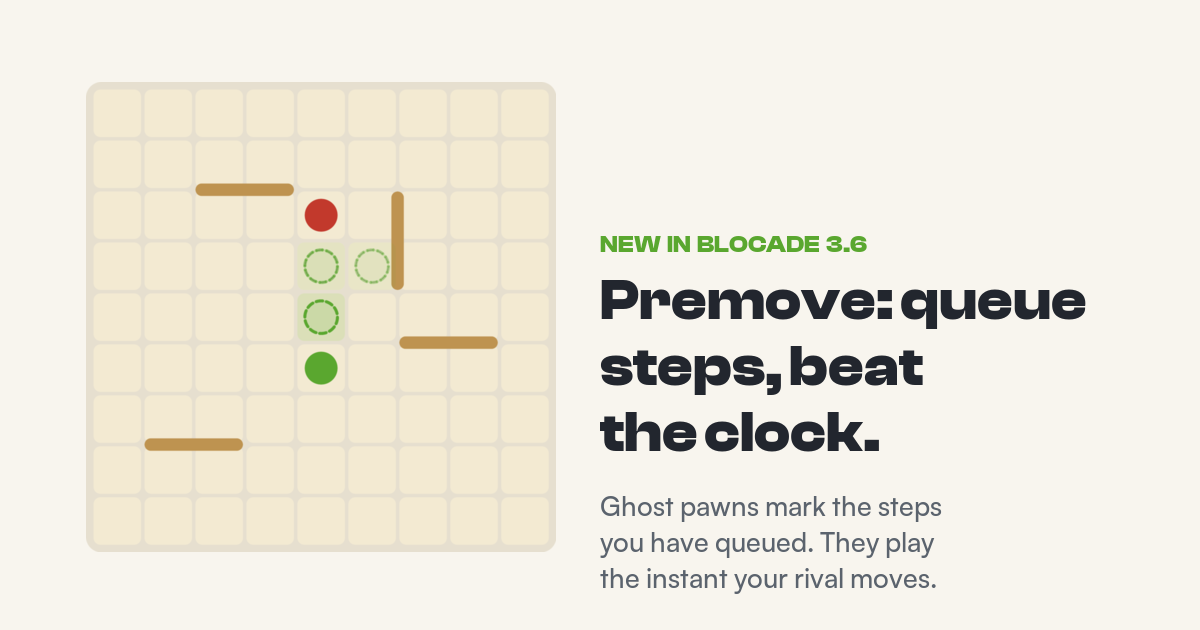
You have won the race. The walls are gone, your pawn is four squares from the far edge, and your rival needs six. Then the clock does what clocks do: nine seconds left, a thumb that lands a square wide, and a game you had already won ends on time. Premove exists for that moment. From Blocade 3.6 you can queue your next pawn steps while your rival is still thinking, and they play the instant their move lands.
The 20-second version
While it is your rival's turn, tap the tile ahead of your pawn. A dashed ghost pawn marks it. When their move arrives, your step plays at once. Tap more tiles to queue a run, or tap the far edge of the board and Blocade lays the shortest route through the walls for you. If a rival wall cuts the route anywhere, the whole run cancels and it is simply your move. Off by default; turn it on from the Options menu in a match.
What premove is
Premove comes from online chess, where chess.com and Lichess both let you make your move before your opponent has finished theirs. The move sits waiting, and the moment it is legally your turn it is sent without you touching the board. Blocade borrows the idea and adapts it for a game with walls: in chess a queued move fails only if it becomes illegal, but in Blocade a wall two squares ahead can leave your next step perfectly legal while turning your whole route into a dead end. So Blocade checks the entire queued route, not just the next step. More on that below.
Premove works in every live online game: ranked, friendly, Royale rounds and Knockout cups. It queues pawn steps only. Walls are never queued, because a wall placed without seeing the board is a wall you would not have placed.
Turning it on
Premove is off for everyone until you switch it on. In a match, open the Options menu and flip the Premove row, which sits under Sound and Reduce Motion with a small ADVANCED tag. The same switch lives in Settings under Match & Chat. Either way, turning it on shows a short sheet first, because a queued step plays before you have seen your rival's move, and premove cannot tell a good step from a bad one. If you are still learning the walls, leave it off. If you play Sprint or Royale, where the clock decides games, you will want it.
Queuing one step
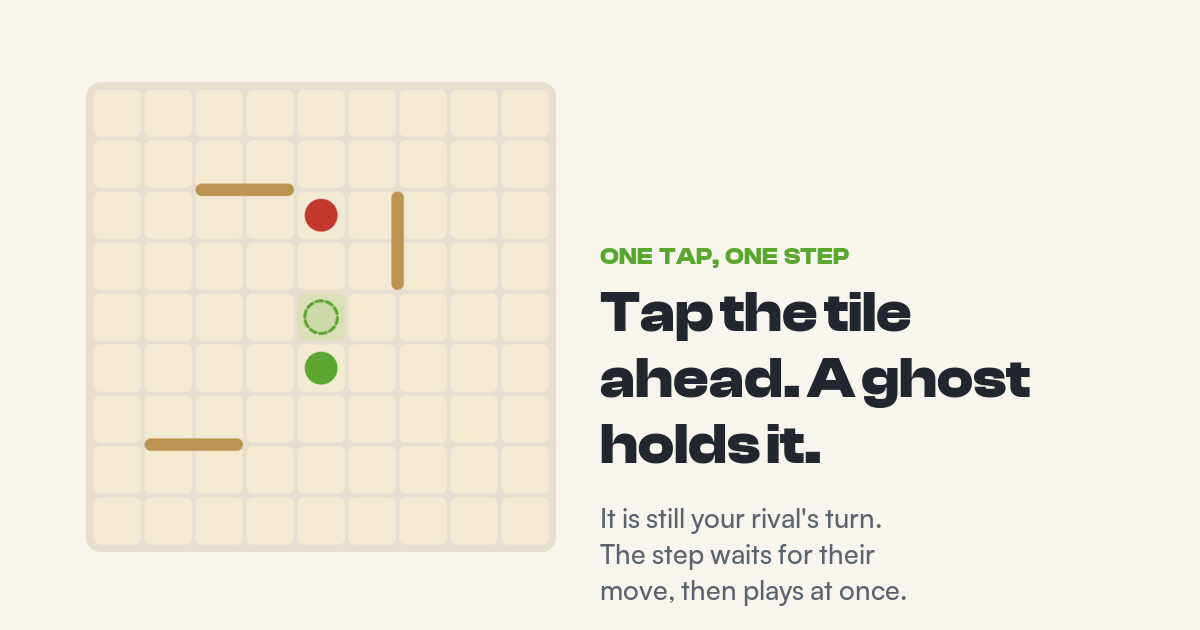
One tap during the rival's turn. The ghost holds the tile until their move lands, then your step plays.
The simplest use. It is your rival's turn, you already know your next step, so you tap the tile. A dashed ghost of your pawn appears on it and the status line under the board says "Premove set". You can keep watching the board, because nothing has been sent yet. When your rival's move arrives, Blocade checks that the tile is still legal for you on the new board. If it is, the step plays with the normal move sound. If it is not, the ghost clears with a short message and it is simply your move, with the usual dots showing where you can go.
You can only queue a tile that is legal for you right now. That includes a jump, if your rival is standing next to you and the landing square is open. A queued jump plays only if it is still a legal jump when your turn comes. It will never become a plain step on its own, and a plain step will never become a jump.
Laying a whole run
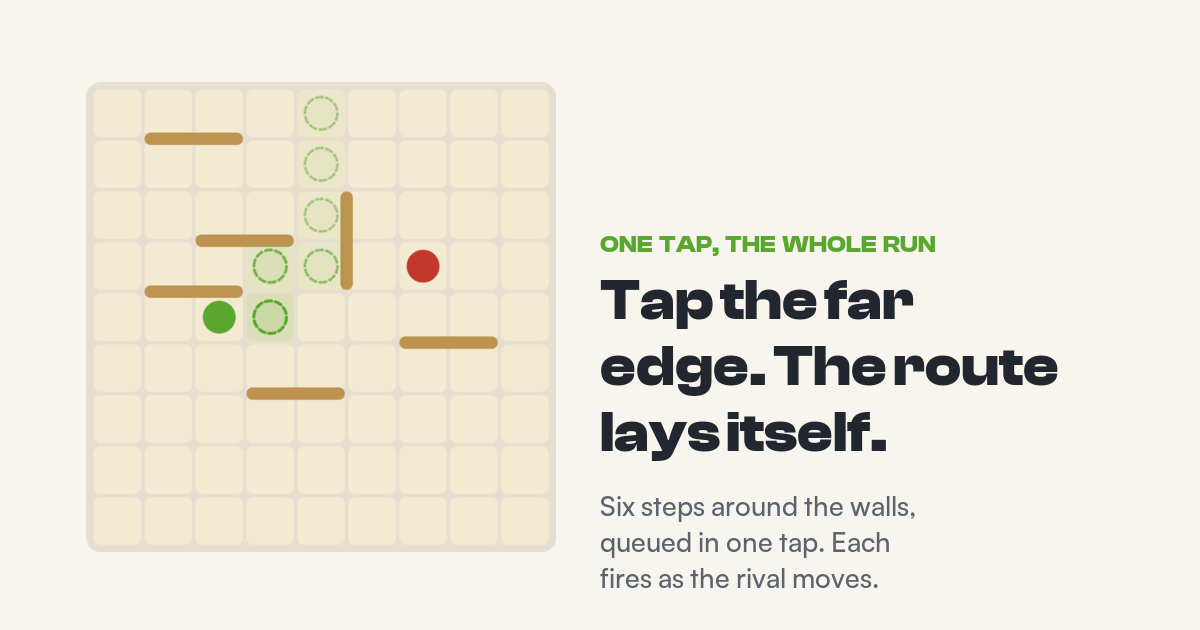
One tap on the far edge. The route lays itself around the walls, the next step drawn strongest.
One step is rarely enough in a race. There are two ways to queue more. Tap a tile next to the last ghost and the run grows by one, in any direction. Or tap a tile further away, and Blocade lays the shortest legal route from your pawn to that tile as a trail of ghosts. Tap anywhere on your goal row, the far edge of the board tinted in your colour, and the route goes to the nearest tile on it. The ghosts fade along the trail, so the step that plays next is always the strongest one.
Every step in the run then fires by itself, one per rival move. Three rival moves later you are three squares further along and you have not touched the board since the tap. Races in Blocade are rarely straight lines, and this is the part that makes premove worth having: a six-step zigzag through leftover walls is one tap, not six.
Routes are planned around walls only, which is how every route in Blocade is measured. When two routes are equally short, you see the one Blocade picked. If you wanted the other, tap a tile on it and that route is laid instead.
What cancels a run
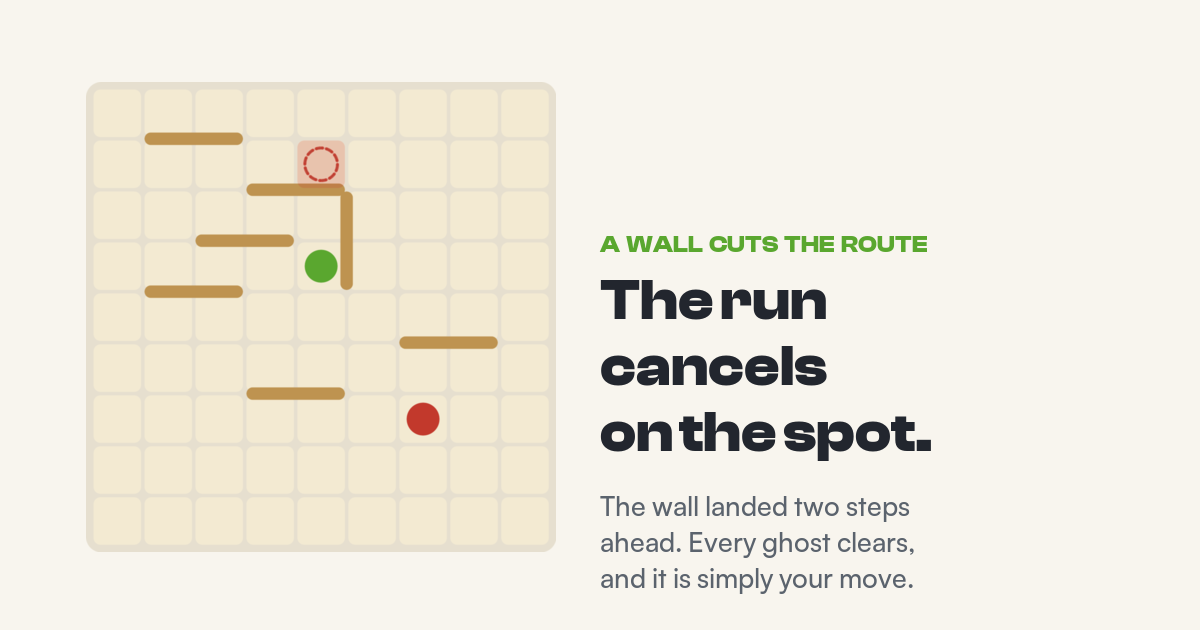
A rival wall two steps ahead. The run cancels immediately, before the pawn walks into the pocket.
This is where Blocade's premove differs from chess. The moment your rival's move lands, Blocade re-checks the whole remaining route against the walls, not only the next step. If their wall has cut the route anywhere, even four tiles ahead, every ghost clears at once, the cut tile blinks red, and you see the message "Premove cancelled, route blocked". Checking only the next step would let a run walk you two squares into a pocket before it noticed. Checking the whole route means a rival wall can never do that.
The next step is also checked against your rival's pawn. If they have stepped onto the tile you queued, the run cancels rather than turning your step into a jump you never chose. A jump you did queue cancels if the rival has walked away, with the message "Premove cancelled, board changed".
•
A rival wall across the route cancels the whole run on the spot.
•
The rival's pawn on your next tile cancels the run. It never becomes a jump.
•
Tapping any ghost, or your own pawn, clears the run by hand.
•
Placing a wall yourself clears it. A wall is a change of plan.
•
Switching premove off mid-game clears it, as does the game ending.
Whenever a run cancels, nothing is sent. It is your move, the dots show your legal tiles, and you play by hand or lay a new run.
What premove actually saves
Here is the honest version. A normal move costs you two things on the clock: the time you spend reacting and choosing, and the time it takes for the rival's move to reach your phone and your move to reach the server. Premove removes the first entirely. It does not remove the second, because Blocade still waits for your rival's move to arrive before it sends yours. On a good connection that second part is a few hundred milliseconds.
Reaction is the big part. Across live games, a mid-game move takes players about two and a half seconds from the moment the rival's move lands. A premoved step cuts that to the network alone. In Sprint, where the whole bank is a minute, that is the difference between flagging in a race you had won and finishing it. In Dash and Tempo it matters less per move and still adds up across a run.
| Situation | What happens when the rival moves |
|---|---|
| Route still clear, next tile free | The next step plays. The run shortens by one. |
| Rival wall anywhere on the route | Whole run cancels. Cut tile blinks. Your move. |
| Rival pawn on your next tile | Run cancels. No jump is played for you. |
| Queued jump, rival still beside you | The jump plays. |
| Queued jump, rival walked away | Run cancels. Board changed. |
| You placed a wall instead | Run was cleared the moment you placed it. |
When to use it
The clear case is the race: walls mostly spent, both pawns marching, the clock deciding. Lay the run once and let it fire. The clear case against is the middle game while both players still hold walls. A queued step commits you to marching during turns you might have spent blocking, and premove will not stop you walking into a strong wall as long as the route stays open. Nothing forces you to keep a run alive: one tap on a ghost ends it.
Two habits help. Queue a run only when you would play those steps by hand anyway, and keep an eye on the ghosts. A run that clears itself is Blocade telling you the board changed, and that is usually a moment worth looking at.
Premove in Blocade: frequently asked questions
Where do I turn premove on?
In a match, open the Options menu and flip the Premove row. It is also in Settings under Match & Chat. It is off by default, and switching it on shows a short warning sheet first.
Does premove work in every game mode?
Every live online game: ranked, friendly, Royale and Knockout. It is not available in local games against the bots, where there is no clock.
Can I queue a wall?
No. Premove queues pawn steps only. Placing a wall by hand clears any run you had queued.
How many steps can I queue?
As many as it takes to reach your goal row. Tap the far edge of the board and the whole route is queued in one tap. A run never grows past the goal row.
Will premove ever walk me into a wall?
No. After every rival move the whole remaining route is checked against the walls. A wall anywhere on it cancels the run before your next step is sent.
Does premove make my moves free on the clock?
It removes your reaction time. Your phone still has to receive the rival's move and send yours, so a premoved step costs a few hundred milliseconds on a normal connection rather than a couple of seconds.
Can premove lose me a game?
Yes, in the same way any fast move can. It plays a step you chose before you saw the rival's move. It cannot play an illegal step, and it cancels when the route is cut, but it cannot tell a good step from a bad one. That is why it is off by default.
Which version has it?
Premove arrives with Blocade 3.6 on iOS and Android. If you do not see the Premove row in the Options menu, update the app.
Play Blocade free
F
Francis
CREATOR OF BLOCADE
Francis is the solo developer who designed and built Blocade — its bots, ranked ladder, and daily puzzles. These guides come straight from the person who made the game.
Follow Blocade on Google Search
Add playblocade.com to your Google Preferred Sources so Google shows the official game, guides, and daily puzzle solutions in AI Overviews and Search.
Add as Preferred Source
Ready to play?
Start a game against a bot right in your browser — free, no sign-up. Then take your streak with you on the app.